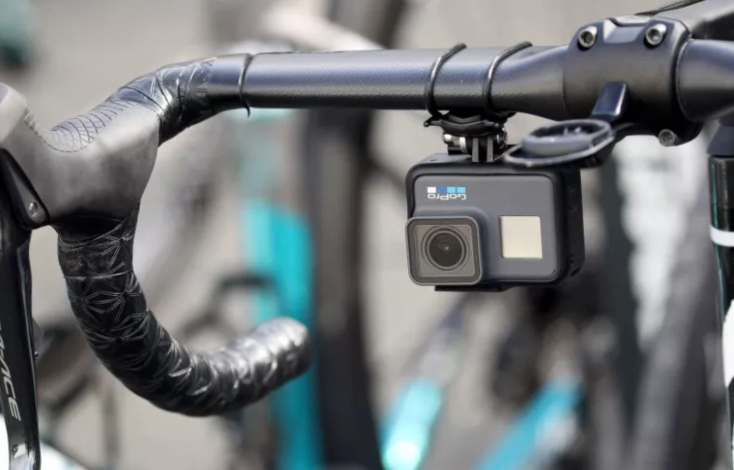
Point of view bike videos can feel like flying, but they can also make people dizzy if the image shakes or the view is confusing. When you plan your ride and think about the camera, your phone can capture clean, steady clips that friends actually want to watch.
Recognize why POV bike footage gets so shaky
On a bike, every bump, turn, and pedal stroke travels through your frame, up your arms, and into the phone. Your body is always moving, and the road rarely stays perfectly smooth. Without help from a Smartphone-Gimbal, even short rides can look more chaotic than they felt in real life.
Wind, speed, and tight turns all make the camera work harder. Your phone’s built in stabilization can handle small vibrations, but larger jolts and fast direction changes will still show. When you understand how the motion flows from the tires to the handlebars and then to the Smartphone-Gimbal or mount, you can plan how to soften that motion before you start recording.
Mount your phone securely before you ride
The most stable POV clips start with a solid mount. If your phone wobbles on the handlebars, no amount of software will fix the problem later. Check that your mount grips the phone firmly and that the clamp cannot twist when you hit a bump. When a Smartphone-Gimbal is part of your setup, balance it carefully so it does not fight your steering.
Avoid mounting the phone too high or far from the bar. A low, centered position usually feels more natural and shows the road, your hands, and part of the bike frame, which helps viewers understand where they are in space. A Smartphone-Gimbal near the stem or slightly off to one side can still give a clean, stable angle if the rest of the mount stays tight.
Do a quick test in a parking lot or quiet street. Ride over a few small cracks, turn gently, and watch the preview as you go. If the image shakes even on smooth ground, fix that problem before you head into traffic or down a hill, because it will only grow worse when the ride gets faster, no matter how good your Smartphone-Gimbal is.
Basic safety checks before filming
- Shake the handlebars lightly while standing still and watch whether the phone, mount, or Smartphone-Gimbal moves separately from the bike.
- Check that no strap, loose cable, or bag can swing into the lens when you stand up on the pedals or change position.
- Make sure you can still reach your brakes and shifters comfortably, and that the Smartphone-Gimbal does not block lights, bells, or safety reflectors.
See also: Why Ab300150b7d4e790 Is Gaining Attention in the Tech World
Use your body to smooth out the ride
Even with a stable mount, your posture affects how the bike moves under you. Relax your shoulders, keep a light but steady grip, and let your arms act as gentle shock absorbers. When your upper body stays calm, the view from the phone and Smartphone-Gimbal feels calmer too, even on rougher paths.
Try to ride in a gear that lets you pedal smoothly rather than stomping on each stroke. Sudden bursts of power shake the frame and create small jerks in the footage. A steady cadence combined with soft hands and slightly bent elbows turns your body into a natural stabilizer that works alongside the Smartphone-Gimbal instead of against it.
Small posture fixes that help
- Keep your elbows slightly out instead of locked straight, so they can absorb bumps before they reach the Smartphone-Gimbal and phone.
- Look farther down the road instead of right at the front wheel; your head will move less, and your steering will be smoother.
- Practice riding no hands in a safe spot, even for just a second, to learn how minor hip shifts guide the bike without harsh bar movements.
Match your route and speed to your filming goals
Not every road is friendly to POV filming. Cobblestones, deep potholes, and random curbs may look dramatic, but they often produce messy, unreadable clips. When you want a clear, relaxing view, choose smoother paths or bike lanes where the Smartphone-Gimbal can shine by polishing already gentle movement.
Speed also changes how footage feels. Riding slightly slower than your top pace can make motion easier to follow while still feeling fast on camera. Long descents or rapid sprints might require shorter clips, because even a well tuned Smartphone-Gimbal can only do so much when the bike bounces constantly for several minutes.
Work with your Smartphone-Gimbal, not against it
A handlebar or chest mounted Smartphone-Gimbal works best when you respect its limits. Balance it correctly, let it boot up fully, and avoid forcing it to hold impossible angles. If you twist the bars too far or lean the bike sharply, the motors have to work harder, and the footage may show sudden jumps when the Smartphone-Gimbal reaches its range.
Think about which mode suits the ride. A follow mode that keeps the horizon level while allowing gentle pans usually feels more natural than a completely locked view. On winding paths, this lets the Smartphone-Gimbal track the general direction smoothly while your steering still feels responsive and safe.
If you prefer a chest mount, remember that your whole upper body becomes part of the stabilizing system. Breathe evenly, avoid exaggerated torso movements, and keep your shoulders relaxed. A Smartphone-Gimbal on your chest can deliver very immersive footage when your posture stays soft and your head and shoulders act as a quiet base.
Frame the scene so viewers feel like they are riding
Stability alone does not make a good POV clip. Composition tells your viewers what to look at. Aim the camera so the handlebars or a small part of the front wheel stays visible in the frame. This anchors the viewer and gives them a sense of place, especially when the Smartphone-Gimbal keeps the horizon steady.
Try to include some of the landscape on both sides instead of pointing only at the road. Trees, buildings, or passing riders along the edges give speed and context. When the Smartphone-Gimbal glides through a corner and the scenery flows smoothly from one side to the other, the viewer feels like they are leaning into the curve with you.
Simple composition ideas for POV rides
- Angle the phone slightly upward so the road, the horizon, and a bit of sky all appear together, making the movement feel open and less cramped.
- Ride a little farther from the edge of the road so the Smartphone-Gimbal view shows more than just a wall or hedge on one side.
- Follow another rider at a safe distance, keeping their back and bike in the lower third of the frame, so the viewer can judge speed and distance easily.
Capture sound that matches the feeling of the ride
POV bike clips often sound harsh because of wind and traffic noise. While a Smartphone-Gimbal deals with movement, you still need to think about audio. Point your phone’s microphones away from the strongest wind when possible, and lower your speed slightly if the roar becomes overwhelming on the recording.
You can also record short voice notes during quieter stretches, describing the climb, the weather, or how the ride feels. These small comments make the POV more personal when viewers watch later. If the live sound is too messy, keep a few seconds of wheel noise and then consider adding gentle music that matches the rhythm of your pedaling.
Review your footage and adjust for the next ride
After each ride, spend some time watching your clips on a bigger screen. Look for patterns instead of judging single moments. Notice when the Smartphone-Gimbal handled bumps well and when the view still felt rough or confusing. Check whether the horizon stays level, whether the bars move too much, and how clear the surroundings appear.
Use what you see to plan small changes for the next session. You might lower the mount slightly, choose a smoother path, or loosen your shoulders so the bike flows more freely under you. Over several rides, these small adjustments add up. Your POV bike videos will feel more like the rides you remember, with the Smartphone-Gimbal quietly doing its job while you enjoy the road ahead.


