Charger overheating is a common concern for people who rely on their devices throughout the day. When a charger warms up more than expected, it can disrupt charging, slow your routine, or make you worry about long-term performance. Heat typically builds when the charger works harder than usual or when airflow around it becomes restricted. Some charging environments also make heat more noticeable—such as soft surfaces or crowded power strips. Understanding why chargers heat up and learning how to keep them cool can help you maintain stability and efficiency. People often choose modern chargers built with better heat management, such as the Anker 735 Charger (Nano II 65W), because their internal design supports safer and more controlled operation.
Everyday Charging Habits That Reduce Heat
Give Your Charger Space to Release Heat
A charger needs airflow to stay cool. When you place it on a soft bed, behind furniture, or in a tight corner, heat becomes trapped around the casing. This makes the temperature rise faster. You keep the charger cooler when you plug it into an outlet with space around it, like a wall socket that is not blocked by bulky objects. Even small adjustments—such as moving it a few centimeters outward or placing it on a flat surface—help air circulate more freely. People often overlook ventilation, but it plays a major role in maintaining stable charging. A well-designed charger like the Anker 735 Charger (Nano II 65W) benefits from open space because its compact form and efficient power delivery system work best when air moves naturally around it.
Avoid Overloading the Charger in Tight Conditions
Charging multiple devices at once increases internal activity, which naturally creates more warmth. This does not mean multi-device charging is unsafe, but it does mean that you need to give the charger better breathing room when several ports are active. You can help it stay cool by placing both the charger and the plugged devices where they have room to ventilate. For example, avoid letting cables gather in a tight cluster around the charger, and keep it away from insulated surfaces. If you use a charger that supports multiple devices—such as the Anker 735 Charger (Nano II 65W), which powers phones, tablets, and notebooks simultaneously—simple spacing choices help it maintain comfortable temperatures.
Use Quality Cables That Support Stable Power Flow
Cables affect charging temperature more than many people realize. A cable that cannot handle the required current may force the charger to work harder. This additional strain can generate heat. Using strong, well-made cables reduces resistance and allows energy to move more efficiently. The smoother the flow, the less heat you see around the charger. This practice also improves charging speed and stability across all device types. Some users adopt the same habit they apply to new phones or an iphone 16 charger—they choose cables that match modern charging standards. When you pair a dependable charger with the right cable, you reduce heat and improve long-term reliability.
See also: Why Ab300150b7d4e790 Is Gaining Attention in the Tech World
Smart Choices That Support Long-Term Temperature Control
Choose Chargers Built With Improved Heat Management
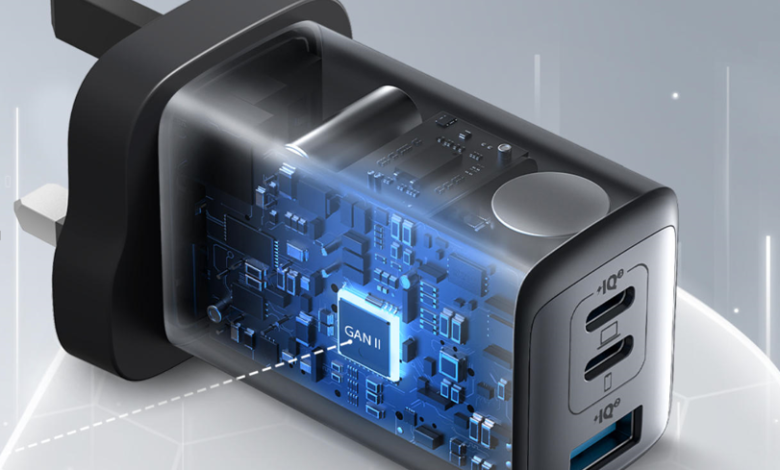
Modern chargers are designed with materials and technologies that reduce heat buildup. GaN-based models, for example, are known for running efficiently in compact sizes because gallium nitride allows better energy conversion. A charger like the Anker 735 Charger (Nano II 65W) uses GaN II technology, which supports higher operating efficiency and smart internal layout. These features help the charger stay cooler during regular use. While it is important not to oversell any product, it is fair to note that advanced materials improve temperature control and give users a smoother charging experience. When you choose a charger engineered for efficiency, you decrease the likelihood of excess heat.
Keep Charging Areas Clean and Unobstructed
Dust and debris may seem harmless, but they affect airflow around your charger. When small particles gather near vents or ports, they can trap heat and slow the cooling process. Keeping your charging area clean helps heat move away from the charger more easily. Wiping the outlet space, clearing nearby clutter, and avoiding fabric-covered areas all help stabilize temperature. This practice becomes even more useful when charging multiple devices or when using a compact charger that works across phones, tablets, and notebooks. Clean surfaces improve the charger’s ability to maintain safe temperatures and prevent unnecessary heat cycles.
Match the Charger to Your Daily Power Needs
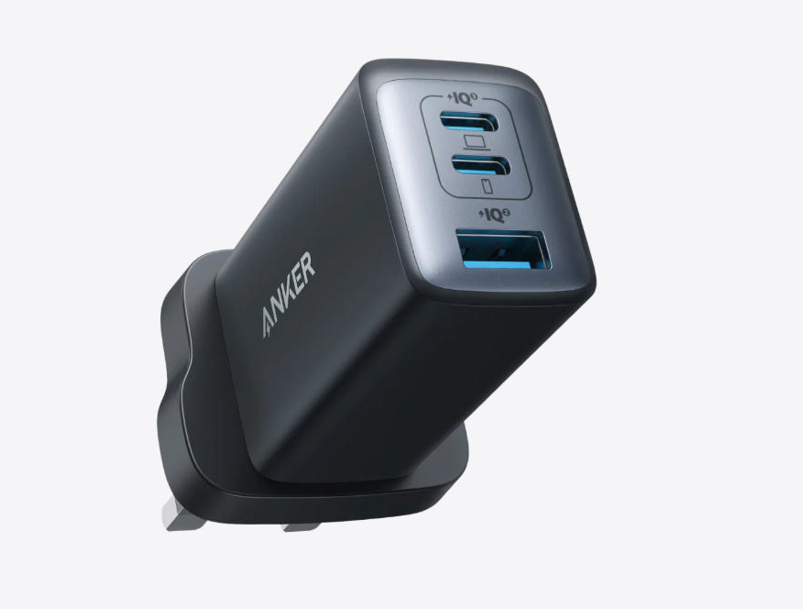
Heat often appears when a charger works at the edge of its capacity. You can prevent this by choosing a charger that comfortably supports your routine. If you travel with a laptop, a phone, and earbuds, using a multi-port charger makes your setup more efficient. When a charger distributes power intelligently, it reduces stress on any single component and helps lower heat output. A model like the Anker 735 Charger (Nano II 65W) supports this approach by delivering stable performance across three devices. When the charger is not forced to deliver more than it is designed to handle, temperature stays more controlled. This smart matching process improves overall reliability.
Conclusion
You keep your charger from overheating by combining smart habits, thoughtful placement, and the right charging tools. Giving your charger enough space, using quality cables, and avoiding overcrowded power areas all help maintain stable temperatures. Modern chargers designed with efficient materials and intelligent systems also support cooler operation by managing power more effectively. A compact model such as the Anker 735 Charger (Nano II 65W) fits naturally into this routine because its engineering supports steady performance across phones, tablets, and notebooks. When you understand how heat forms—and how simple choices reduce it—you create a safer and more reliable charging experience for every device you use.